BLOG POST
If you've spent any time looking into how to get more Google reviews, you've probably noticed something frustrating: the options range from "free but tedious" to "powerful but expensive enterprise platforms built for chains with 200 locations." For most local business owners, neither extreme fits.
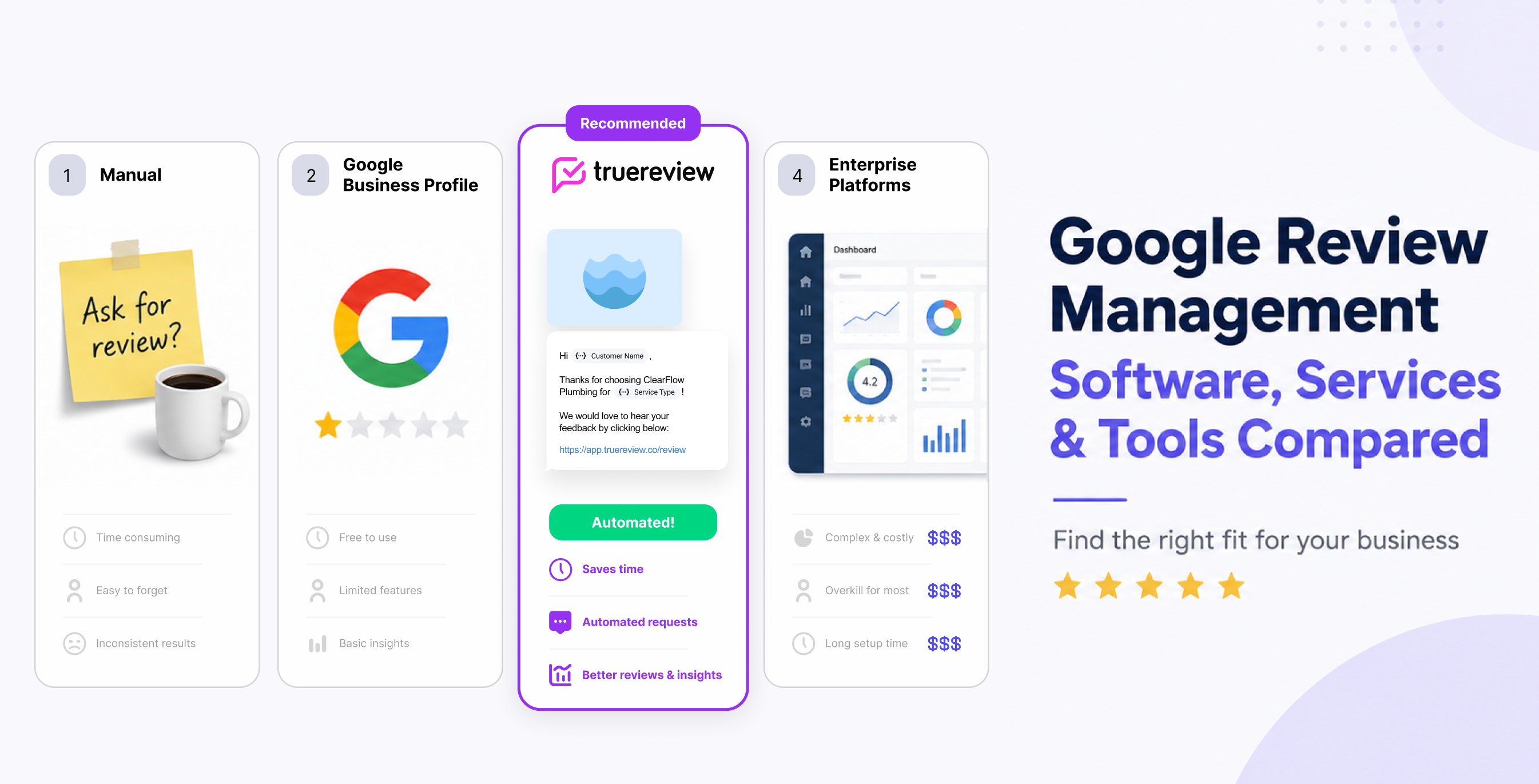
This guide breaks down the four main approaches to Google review management — manual methods, native Google tools, dedicated review request software, and full-featured review platforms — so you can pick the option that actually matches your business size, budget, and how much time you can spend on it. We'll cover what each approach costs, what it does well, where it falls short, and which type of business it's best suited for.
Before getting into the tools, it's worth being clear about what you're trying to accomplish. Google reviews influence three things that directly affect revenue:
Local search ranking. Review quantity, recency, and rating are signals Google uses to decide which businesses appear in the local 3-pack. More reviews from real customers typically mean more visibility.
Click-through rate. When your business does appear in search results, a 4.8-star rating with 340 reviews gets clicked far more often than a 4.2-star rating with 28 reviews. Both your star count and review volume matter.
Conversion. Once someone lands on your profile or website, recent positive reviews build trust and reduce hesitation. Stale reviews from three years ago do the opposite.
The job of any Google review management tool is to help you get more reviews, respond to them faster, and turn that activity into a competitive advantage. The four approaches below each do this differently.
Restaurants have their own set of options worth reviewing — see our breakdown of restaurant feedback software.
The DIY approach. You ask customers in person, send the occasional text or email with a Google review link, and log into Google Business Profile to read and respond to reviews when you remember.
What it costs: Nothing, beyond your time.
What it does well: Genuinely free. Works fine when you have a low volume of customers and a strong personal relationship with each one. The reviews you do get tend to feel authentic because the request was personal.
Where it falls short: Asking is awkward, and most owners forget to do it consistently. You'll typically capture 5-10% of the reviews you could have gotten, because the follow-through depends entirely on your memory and willingness to ask. There's no reminder system, no tracking of who you've asked, and no way to scale beyond what you can personally handle. Responding to reviews also requires you to log into Google Business Profile and check manually — easy to let slip for days or weeks.
Best for: Solo operators with fewer than 20 customers per month and a flexible schedule. If you're past that, manual stops working quickly.
Google provides a built-in review request feature inside Google Business Profile. You can generate a short review link, share it with customers, and respond to reviews directly from the dashboard or the Google Maps app.
What it costs: Free.
What it does well: It's free, it's official, and you don't have to learn a new platform. The review link works on any device, and you can copy it into emails, texts, or even print it as a QR code. Responses post immediately. For owners who just need the basics, Google Business Profile gives you a starting point without committing to any third-party tool.
Where it falls short: Google's tools are minimal by design. There's no automation, no scheduling, no reminders for customers who didn't respond the first time, and no analytics beyond raw counts. You still have to remember to send each request, and each one is a manual action. There's also no way to collect private feedback before customers post publicly — every request you send goes straight to public Google. And if you have multiple locations, you're managing each one in a separate dashboard with no consolidated view.
Best for: Businesses just getting started with reviews who want to test the basic workflow before paying for software. It's also a reasonable backstop for any business — you should have your Google Business Profile claimed and optimized regardless of what other tools you use.
This is the middle ground between free-but-manual and full-platform-but-overkill. Tools in this category — TrueReview is a representative example — focus specifically on making it easy to request and manage Google reviews without bundling in dozens of features you don't need.
What it costs: TrueReview plans (billed annually) start at $29/month for Starter (250 review requests, email-only, 1 location), $59/month for Small Business (500 requests, SMS + email, 1 location), and $179/month for Premium (2,500 requests, SMS + email, 5 locations included with add-on locations available a la carte). Monthly billing runs $49, $99, and $299 respectively. All plans include a free 14-day trial.
What it does well: Automation is the main draw. You add a customer's name and phone number or email after a job is completed, and the software sends a branded review request automatically via SMS or email. Customers who don't respond get polite reminders through a multi-step drip campaign — and automated follow-ups alone often double or triple response rates compared to a single ask.
You also get a single dashboard for monitoring reviews across Google, Facebook, and dozens of other platforms; an AI Review Response Generator that drafts replies in your tone; automated review replies; QR codes and shareable links for in-store use; embeddable review widgets for your website; CSV import for sending bulk requests; and AI-powered insights that surface customer sentiment and common feedback themes.
For multi-location operators, TrueReview's Premium plan handles up to 5 locations out of the box and lets you add more a la carte, with team management and permissions so you can give each location's manager access only to their location's reviews and customers. Native integrations with Zapier, ServiceTitan, LionDesk, Square, Acuity Scheduling, Mangomint, Google Contacts, and Google Sheets — plus a full API — let you trigger requests directly from your CRM, scheduling tool, or POS system without writing any code.
Where it falls short: It's not free, and if you genuinely have 5 customers a month, the ROI math is harder. These tools are also focused on review generation and reputation management specifically — they're not full marketing suites, so if you also want webchat, listings management, and customer messaging in one place, you'll outgrow them eventually.
Best for: Local service businesses, contractors, dental practices, auto shops, salons, restaurants, real estate agencies, property management companies, and multi-location operators (up to ~50 locations) that want to systematize review collection without paying enterprise prices. This is the sweet spot for most independent businesses and growing chains.
At the top end of the market are platforms like Birdeye, Podium, and Reputation.com. These bundle review management with customer messaging, webchat, surveys, listings management, social media tools, and sometimes payments.
What it typically costs: $300-$1,500+ per month, often with annual contracts and per-location pricing.
What it does well: If you have a large multi-location operation or a marketing team that needs everything in one platform, these tools deliver. You get review generation, response management, sentiment analysis, competitor tracking, listings sync across 50+ directories, two-way SMS with customers, and integrations with most CRMs and POS systems. Reporting is detailed enough for franchise headquarters with hundreds of locations to track performance by region.
Where it falls short: Cost and complexity. For a single-location business or even a small chain, you're paying for capabilities you'll never use. Implementation often takes weeks, sales cycles involve multiple calls, and contracts are typically annual. The interfaces tend to be feature-dense in a way that overwhelms owners who just want more Google reviews.
Best for: Large multi-location chains (50+ locations), franchises with corporate marketing teams, agencies managing reviews on behalf of dozens of clients, and any operation that genuinely needs the full suite of customer messaging and listings management tools.
Three questions cut through the noise:
How many customers do you serve per month, and how many locations? Under 20 customers and one location, manual works. 20-2,500 customers across one to five-ish locations, dedicated review software is the right fit. Beyond that — especially if you have 50+ locations or need a full marketing suite — a larger platform may make sense.
Do you want review collection only, or a broader marketing suite? If reviews are the bottleneck, don't buy a 12-feature platform to solve a 1-feature problem. Buy the focused tool.
How much do follow-ups matter to you? This is the single biggest difference between free tools and paid software. Automated reminders are usually what doubles or triples your review volume — not the initial request. If you're not going to send follow-ups manually (and almost no one does, consistently), paying for automation pays for itself quickly.
The fastest way to know if a tool fits your business is to connect your Google Business Profile, send 10-20 review requests to recent customers, and see how many reviews you get in two weeks. If the answer is more than you typically get in a month manually — which it almost always is — the math works.
Ready to stop manually chasing Google reviews? Start your free 14-day trial of TrueReview — send up to 250 SMS and email review requests at no cost while you test it on real customers, with no setup fees and the ability to cancel any time.





