BLOG POST
Your first flag was rejected. Most articles end there. This is where the real work begins.
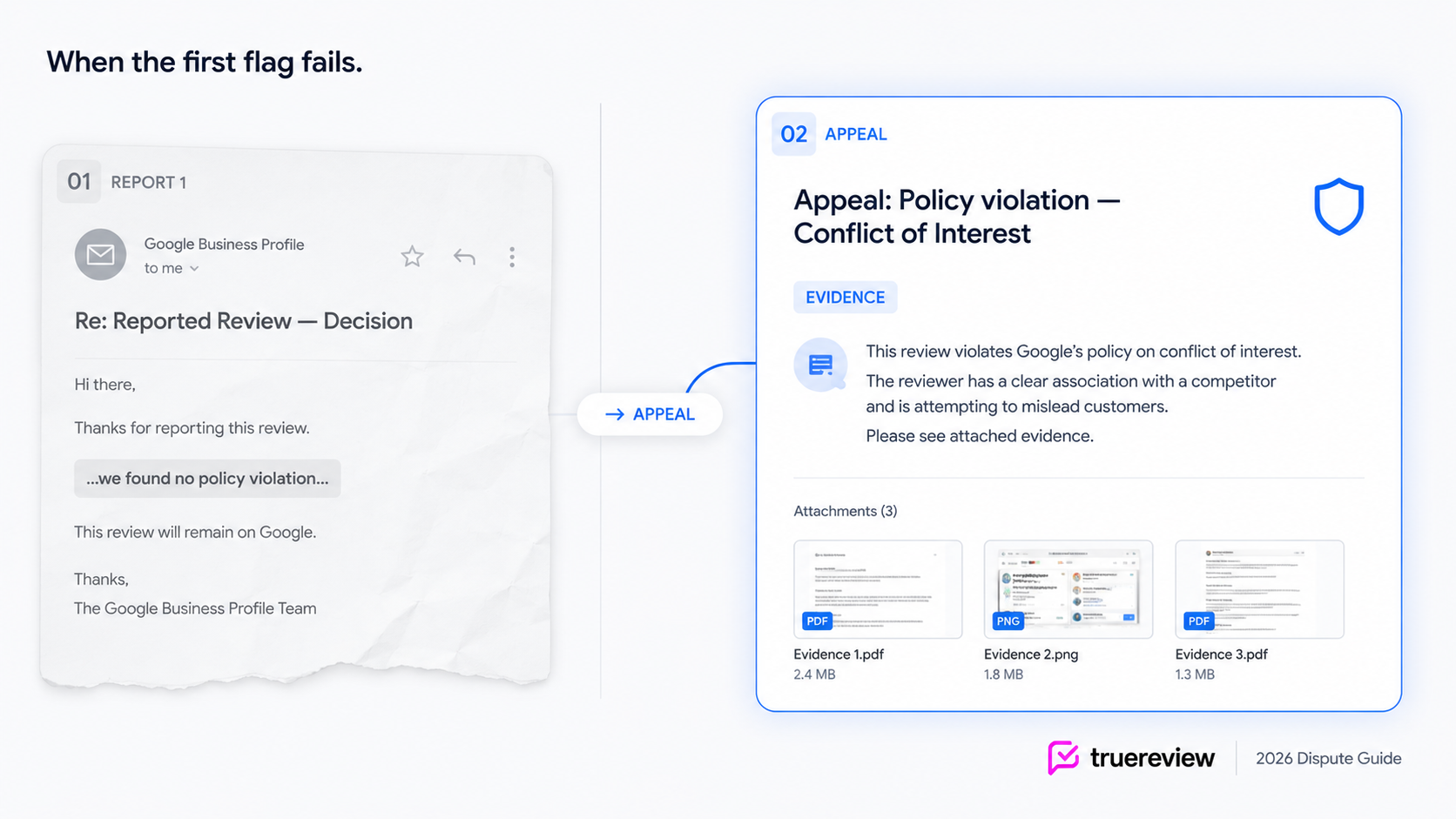
If you're reading this, you've probably been through the same loop everyone goes through. You flagged a review you knew shouldn't be on your profile. Google sent the standard email — "We've reviewed the report and found no policy violation." Now you have one shot at an appeal, and somewhere in the back of your head you know that if you submit the same generic argument again, it'll get the same generic rejection.
The good news: appeals are read by humans, not the automated system that handled your first report. The bad news: that human is reading hundreds of appeals per day, doesn't know your business, doesn't speak your local dialect of English, and is making the decision on whatever you submit in 90 seconds. Before you appeal, check the review against this list of Google review policy violations to confirm it may qualify for removal. Winning the appeal is mostly about giving that reader exactly what they need to say "yes" in the time you have.
This guide is the post-rejection playbook. The one-time appeal mechanism, the evidence pack that wins, the language Google's reviewers actually respond to, when to escalate to the Business Profile Community forum, and the last-resort channels worth knowing about for cases where the standard appeal still fails.
The first report you submitted was processed by Google's automated system. That system runs pattern-matching against the review and your category selection — it looks for specific signals that match the policy you picked, and if it doesn't find them in the first few seconds of analysis, it returns "no policy violation" by default.
This isn't a bug. It's how Google handles the volume — 292 million policy-violating reviews blocked or removed in 2025, billions submitted overall. There's no other way to triage at that scale without an automated first pass.
The implication for your appeal: you're not arguing with the original decision. You're presenting evidence to a human moderator who has never seen your report before. The first decision is mostly irrelevant. What matters is what's in your appeal submission, framed correctly, with enough specificity that the moderator can confirm the violation in under two minutes.
Three reasons first flags most commonly fail:
Wrong category. The most common mistake. Reviews from former employees reported as "Spam" when they should be "Conflict of Interest." Personal attacks reported as "Off-topic" when they should be "Harassment." The automated system is evaluating against your category choice, so a mismatched category fails before the analysis even starts.
Insufficient pattern signals. A fake review that's been written carefully — no obvious patterns, plausible-sounding text, no overt slurs — won't trigger automated detection. The human moderator needs you to bring the evidence that proves it's fake.
No context for the moderator. A review with "this place is run by crooks" reads as opinion to an automated system. The same review with your evidence packet showing the reviewer's prior employment at a competing business reads as Conflict of Interest. Same content, different outcome because the appeal added context.
You get one appeal per review. Use it carefully.
The path: go to Google's Reviews Management Tool, confirm your Business Profile, select "Check the status of a review I reported previously and appeal options," select the review (you can submit up to 10 appeals in one batch), select "Continue → Submit an appeal," fill out the appeal form, submit.
When the appeal is filed, the status in the Reviews Management Tool changes to "Escalated — check your email for updates." Final decisions come by email, usually within several days to two weeks. If the review is removed, you'll see the status change to "Review removed." If it's not, the status will stay at "Escalated" and the email will confirm the review complies with policy.
There is no second-tier appeal inside this process. If your one-time appeal also fails, you're out of options within Google's standard tools — which is where sections 5 and 6 below become relevant.
This is the work most appeals skip. The moderator can't see your CRM, your records, the reviewer's other accounts, or the context that's obvious to you. Everything they know about your case comes from what you submit. Treat the appeal as the only chance you'll have to brief a moderator who has no other context.
For each review, the evidence pack should include:
Screenshots of the reviewer's full profile. Open the reviewer's name link to their public contributor profile. Screenshot every review they've left. Look for geographic inconsistency (reviews scattered across cities they couldn't have visited in the same timeframe), language patterns (similar phrasing across multiple business reviews), and account age. If their profile shows reviews of businesses across three different states posted within the same week, that's a Fake & Misleading Content signal.
Transaction or service records. A simple text file or screenshot showing no record of the reviewer in your customer database, appointment system, or transaction log. You don't need to share customer data — a screenshot or note confirming "no appointments scheduled under this name during the timeframe described" is enough. The moderator just needs to see you've checked.
Relationship documentation. If you suspect a Conflict of Interest, document the relationship. A former employee's offer letter or termination date (redacted appropriately). A LinkedIn screenshot showing the reviewer at a competing business. Court documents from an active dispute. Whatever proves the reviewer isn't a neutral customer.
Communication evidence. If the reviewer has contacted you directly — by email, WhatsApp, SMS, social media DM — screenshot everything with timestamps. Especially if any of those messages reference the review, demand payment, or contain threats.
The original review URL. Copy the direct link to the review by clicking its share icon. Include this in the appeal text so the moderator can confirm they're looking at the same review you are.
Store everything in a single folder per review. You may need it again if you escalate to the Community forum.
If you originally picked the wrong category, your appeal is harder but not impossible. The workaround: in the appeal text, acknowledge that the review also fits a different policy category and explain which one. The moderator can choose to apply that category's standard even though it wasn't your original selection. This isn't guaranteed to work, but it's better than relying on an appeal under the wrong policy.
Some industries have to build their evidence and responses around extra rules. Dental practices, bound by patient-privacy law, are one — related: our complete guide on how to remove problematic google reviews for dental practices. Law firms face similar limits, since confidentiality rules shape what they can say in a dispute or public reply — for more tactics, see our guide on how to remove problematic google reviews for law firms.

One of the hardest parts of the dispute process isn't writing the appeal — it's tracking it. A single business might have three or four active appeals at any given time, each at different stages. Review Radar — included in TrueReview's Small Business and Premium plans — keeps the full lifecycle organized: flagged → reported → appealed → removed. When a review you've reported moves to "Removed" in Google's system, Review Radar shifts it to the Removed tab automatically. You don't have to check back. For business owners or agencies handling multi-location appeals, that visibility is the difference between catching the missed appeal deadline and missing it.
The Google moderator reading your appeal has 90 seconds and dozens more appeals queued behind yours. Treat your appeal as a short executive brief, not a complaint letter.
What to avoid: emotional language, narrative storytelling about how the review has hurt your business, attacks on the reviewer's character, references to other reviews on your profile, and any version of "Google should remove this because I'm a good business." None of those make the moderator's decision easier.
That's roughly 80 words. It would take the moderator under a minute to read. It names the policy, presents the evidence, frames the harm, and asks for the specific action. That's the structure that wins.
If your appeal still fails — meaning the review came back as "policy compliant" after both the initial report and the appeal — the Google Business Profile Community forum is your next legitimate path.
This is a public forum staffed by volunteer Product Experts. Some of them are independent local SEO professionals who've built relationships with Google's product team and have the ability to escalate cases for additional review. Their escalation isn't a guarantee of removal — they don't have a back door to override Google's policies — but they can flag a case for human review when an automated decision (or even a moderator decision) looks wrong.
How to use it: post your case in the forum with a clear summary of the violation, your case ID from the Reviews Management Tool, screenshots of the review and reviewer profile, and the specific reason you believe the appeal decision was wrong. Be concise. Be specific. Don't post emotional appeals or generalized complaints about Google's process.
A few honest caveats:
The forum is public. Anyone can read your post, including the reviewer. Don't post anything you wouldn't want them to see. Don't share customer data.
Response is unpredictable. Some posts get Product Expert engagement within a day; others sit for weeks with no response.
Some posts get answered by other business owners or low-engagement community members who can't actually escalate. The Product Experts to look for are users with a "Product Expert" or "Diamond Product Expert" badge on their profile — they're the ones with the escalation tools.
You may also see firms in the forum offering paid escalation services for $1,000+ per case. The Product Experts they're working with are real, but you can post in the same forum yourself for free. The thing you'd be paying for is the expertise to frame the case correctly and the relationship to get attention quickly. For high-stakes cases, sometimes that's worth it. Often it's not.
When the appeal has failed and the Community forum hasn't moved the case, there's one more soft channel worth knowing about: Google's official @GoogleSmallBiz account on X (formerly Twitter). You may run across a "DMCA takedown" trick pitched as a shortcut when appeals fail — it's riskier than it looks. See also our breakdown of the fake dmca loophole.
This is a real Google-staffed account, primarily focused on small business advice and updates. They don't formally handle review disputes, but they do occasionally redirect specific cases to internal teams when the case is clear and well-documented. The bio currently directs you to standard support channels first, which is the right path — but for cases that have exhausted those channels, a public tweet sometimes generates an internal flag that the standard process didn't.
The honest reality: this is a last-resort, low-probability channel. Most tweets at @GoogleSmallBiz won't move your case. The ones that occasionally do tend to be (a) cases where there's a clear, documented Google policy violation that was missed by both the automated and human review, (b) cases involving extortion or coordinated attacks where the evidence is public-record clear, or (c) cases involving a specific Google system bug rather than a policy judgment call.
If you tweet at them, keep it brief, link to the review, summarize the violation in one sentence, and reference your case ID. Don't expect a public response — most engagement happens via DM after they ask for one.
A note: tweeting at Google about a review can sometimes draw attention from people other than Google — including the reviewer or hostile commenters. If your case involves an extortion attempt or organized attack, consider whether public visibility is worth the risk before posting publicly. A DM-first approach (sending Google a direct message rather than a public tweet) is usually safer for sensitive cases.
For some reviews, the answer is going to be no. Even with a strong appeal, correct category, full evidence pack, and Community escalation, Google occasionally upholds reviews that clearly look like violations from the outside. This is part of the system — automated enforcement at scale produces both false negatives and false positives, and businesses absorb both. It helps to be clear-eyed about which reviews actually qualify before you invest in an appeal. For more tactics, see our guide on how to remove negative google reviews that cross the line.
When the appeal has failed and the escalation paths haven't worked, your options narrow:
Resolve with the customer if possible. Even fake or hostile reviewers sometimes update or remove their own reviews if you reach out professionally — particularly when the reviewer has confused you with another business or made a factual mistake. What's not allowed: offering anything of value (refunds-conditional-on-removal, discounts, free services) in exchange for removal. That violates Google's Rating Manipulation policy.
Respond publicly to neutralize the review. A calm, professional response signals to future readers that you've engaged with the issue and contested the legitimacy where appropriate. Future customers reading your profile pay attention to how you handle disputed reviews. The right response doesn't argue with the reviewer publicly — it addresses what future readers need to see.
Build review velocity to dilute the impact. A single problematic review on a profile with 200 recent positive reviews is statistical noise. A single problematic review on a profile with 25 total reviews is a visible scar. Systematically collecting reviews from real customers is the most reliable long-term defense against reviews you can't get removed.
Legal action for clear defamation. Reserved for cases where the review contains false statements of fact (not opinion) that you can prove are false and have caused measurable financial harm. This is expensive, slow, and attracts attention (the Streisand Effect is real). Talk to a defamation attorney before pursuing it. For most cases, this is the wrong move.
For everything else, the realistic answer is that some reviews just don't come down — even when they probably should — and the businesses that come out ahead are the ones who handle the failed appeals professionally while continuing to compound positive reviews around them.
If you want the appeal lifecycle tracked automatically across all your reviews — flagged, reported, appealed, removed — that's what Review Radar in TrueReview's Small Business and Premium plans is built to do. Start a free trial and have monitoring running before your next dispute. Or see the full Review Radar workflow for how it fits into the dispute process.
The appeals you win are the ones where the evidence was clear, the category was right, and the moderator had everything they needed to confirm the violation in 90 seconds. Everything in this post is the work of making those three things true for every review you dispute. Other owners share what worked and what backfired on forums when an appeal dead-ends. We sorted the useful advice from the myths — for more tactics, see our roundup of how to remove bad google reviews, according to Reddit.





