BLOG POST
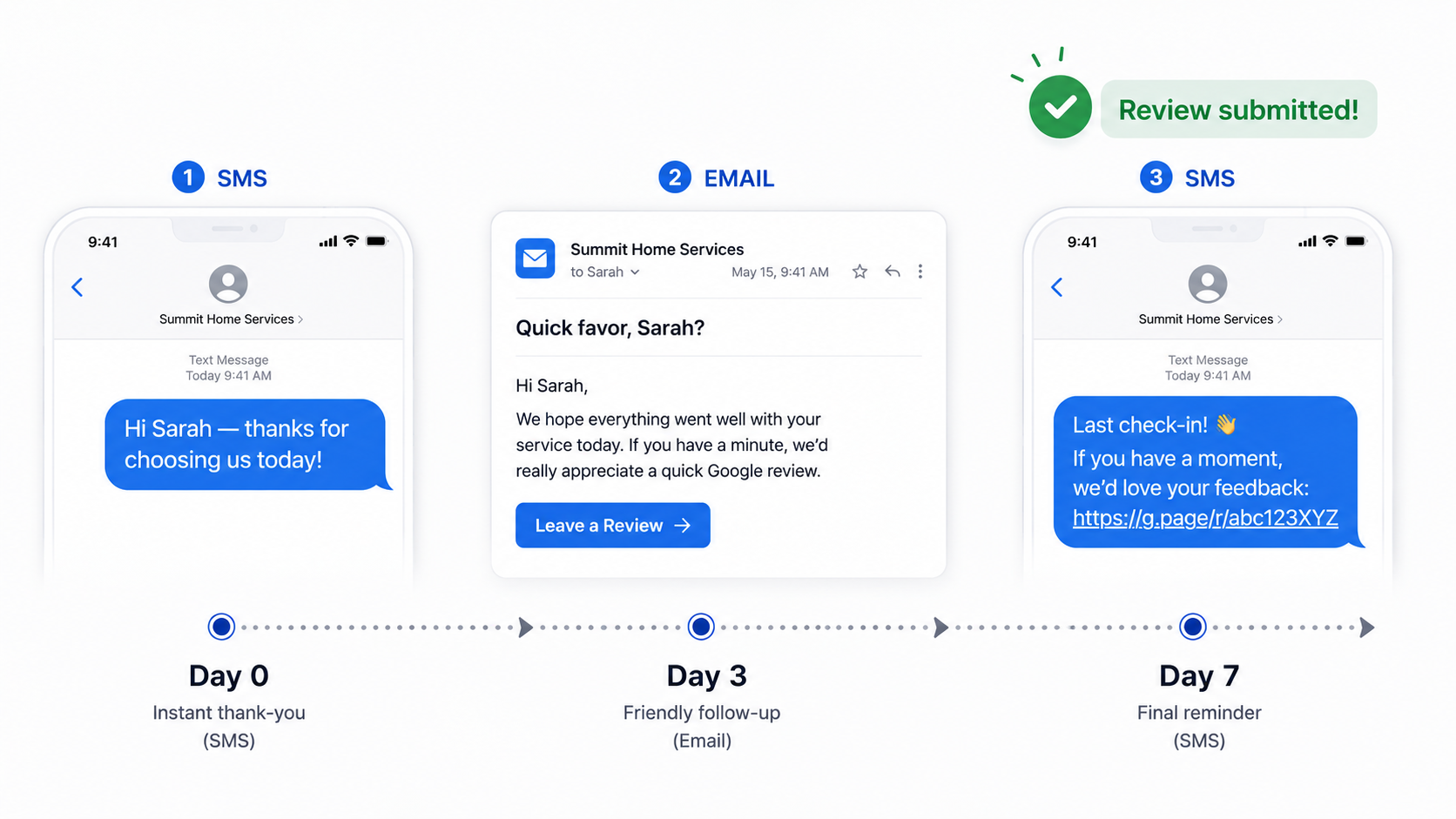
An automated review request drip campaign sends a sequence of messages to each customer until they either leave a review or opt out — typically: (1) an initial SMS within 24 hours of service, (2) an email follow-up at day 3 for non-responders, and (3) a final SMS reminder at day 7. This 3-step sequence converts 2-3x better than single-message asks, because most customers who will leave a review don't do it the first time they're asked — they do it the second or third. A drip campaign is one piece of a larger automated review request system that handles timing, channels, and follow-ups for you.
The right drip campaign is automated (fires from your CRM or service software), smart-stopping (stops the moment someone leaves a review or opts out), and patient (waits enough time between messages that it doesn't feel pushy). Set it up once, and it runs forever. Most drip campaigns lean on email as the workhorse channel, but for review requests SMS is now the higher-converting opener in most local-business contexts — 3 to 5 times the conversion rate of email on the initial send. If your drip sequence leads with SMS rather than email, see our deeper guide on how to request reviews with SMS for message structure, timing rules, and the two-message sequencing pattern that consistently outperforms longer sequences.
A single review request — sent once, asked once — converts at roughly 5–10% on average for most service businesses. For the broader case for review automation generally — beyond just drip campaigns — see our complete guide to automating Google review requests.
A well-built drip campaign converts at 15–25%. That's the difference between a business that builds 30 reviews a year and one that builds 150.
The reason isn't complicated. Customers who would gladly leave a review often:
A drip campaign accounts for this. Industry research consistently shows:
The math: if your one-shot review ask converts at 8% and a 3-step drip converts at 22%, switching takes a business from 80 reviews per 1,000 customers to 220. For most local businesses, that's the difference between page 2 of Google search results and the Map Pack.
The drip structure that consistently outperforms longer sequences for review requests is:
Step 1 — Initial SMS (sent within 24–48 hours of service completion)Step 2 — Email follow-up (sent 3 days later, only if no response)Step 3 — Final SMS reminder (sent 7 days after initial, only if no response)
Total sequence: 7 days, 3 touches, automatic exit when the customer responds.
Why this structure works:
The exit conditions matter as much as the touches. A good drip stops immediately when:
Without smart exit logic, a drip campaign annoys exactly the customers it should be celebrating.
Since two of the three touches are texts, nailing the SMS wording carries most of the weight. For more tactics, see our guide on how to ask for a google review by text.
The setup workflow varies slightly between review platforms, but the structure is consistent across most modern tools. Here's how to build a 3-step drip in TrueReview specifically.
{first_name} — customer's first name{business_name} — your business name{review_link} — the direct Google review link (automatically inserted)A template that works well for most service businesses:
Hi {first_name} — thanks for choosing {business_name}! If you have 30 seconds, we'd really appreciate a quick Google review: {review_link}
Subject: Quick favor, {first_name}?
Hi {first_name},
Hope you're happy with the work we did on [date]. If you have a moment, would you mind leaving us a quick Google review? It's the single best way you can help out a small business like ours.
[Leave a Review button]
Either way, thanks for choosing us.
— {business_name}
Hi {first_name} — last check-in! If you have a second, a Google review would mean a lot: {review_link}
The "last check-in" framing implicitly signals you won't keep asking, which actually increases response rates — customers know this is their final opportunity to be helpful.
Once testing is complete, your drip campaign is live. Every new customer added to TrueReview (via CRM integration, CSV upload, or manual entry) automatically enters the sequence.
For the feature page that documents this end-to-end, see SMS and Email Drip Campaigns.
Three drip campaign templates for different vertical contexts. Customize the names, services, and language to match your business voice — but keep the structure.
Want more ready-made wording to drop into each step? We explore this further in our library of sms review request templates.
Step 1 SMS (Day 0):
Hi {first_name} — thanks for choosing {business_name} today! Hope everything's working great. If you have a sec, a quick Google review goes a long way for a small business like ours: {review_link}
Step 2 Email (Day 3):
Subject: Hope the [service] is treating you right
Hi {first_name},
Just wanted to follow up on the visit from [technician_name]. Hope everything's working well since.
If you've got a minute, we'd really appreciate a quick Google review. It's the single best way you can support a small team like ours — and helps other folks in [city] find us when they need similar work.
[Leave a Review button]
Thanks again for trusting us.
Step 3 SMS (Day 7):
Hi {first_name} — last check-in! If the {service} is still working great and you have 30 sec, a Google review would mean a lot: {review_link}
Step 1 SMS (Day 0):
Hi {first_name} — thanks for visiting {business_name} today. If you have a moment, we'd appreciate a Google review: {review_link}
Step 2 Email (Day 3):
Subject: Quick favor, {first_name}?
Hi {first_name},
Hope you've been well since your visit. If you have a few minutes, would you mind leaving us a quick Google review?
[Leave a Review button]
Reviews help other patients in [city] find us when they're looking for [practice type]. Either way, thank you for your continued trust.
— Dr. [provider_name] and the {business_name} team
Step 3 SMS (Day 7):
Hi {first_name} — just a final reminder! If you'd like to leave us a quick Google review, here's the link: {review_link}. Thanks!
Step 1 SMS (Day 0):
Hi {first_name} — hope you loved everything today! If you have 30 seconds, would you leave us a quick Google review? {review_link}
Step 2 Email (Day 3):
Subject: Still loving it, {first_name}?
Hi {first_name},
Hope you're still loving [whatever they got — the cut, the color, the treatment]! If you've got a sec, would you mind leaving us a quick Google review?
[Leave a Review button]
Mean a lot to our team. And tag us on Instagram if you do a photo — we'd love to repost!
Step 3 SMS (Day 7):
Hi {first_name} — last little nudge! A Google review would seriously help us out: {review_link}
Some verticals have their own timing quirks worth tailoring the drip around. For session-based creative work, related: our complete guide on photography studios get more google reviews.
1. Sending the first message too fast. A drip that fires the SMS the moment the technician closes the job ticket — while the customer is still in the driveway — feels invasive. Wait at least 1–2 hours.
2. Asking for "5-star" reviews specifically. This violates Google's policy. Don't ever say "leave us a 5-star review" — just "leave us a review." Customers will mostly choose 5 stars on their own if your work earned it.
3. No smart exit conditions. A drip that keeps texting and emailing after a customer has already left a review trains them to dislike your brand. Set up the smart-stop logic before you launch.
4. Too many steps. Three touches is the sweet spot for review requests. Four or five touches starts to push into annoyance territory, with diminishing returns and rising opt-out rates.
5. Generic, marketing-y copy. "Click here to leave us a 5-star review of our amazing service!" reads as spam and converts at 1-2%. Plain, personal copy ("Hi {first_name}, thanks again for today — if you have 30 seconds, a Google review would mean a lot") converts at 15-25%. Write the way a real person would talk.
6. Forgetting the feedback gate. Without a feedback-gate exit condition, customers having a bad experience get the drip too — and often respond by leaving a public 1-star review. Route unhappy customers to private feedback first.
7. Asking too many times for the same customer. Customers who didn't leave a review the first time are unlikely to do it the fifth. Cap at 3 touches per campaign, and don't restart the campaign months later "to try again."
8. Sending during off-hours. Federal TCPA rules cap SMS sends at 8 AM to 9 PM in the recipient's local time zone. Some states are stricter (Florida is 8 AM–8 PM). Most platforms handle this automatically — verify yours does before launching.
9. Skipping personalization. "{first_name}" is the bare minimum. Adding {service_type} or {technician_name} lifts conversion 30–50% by signaling the message was actually about their visit, not a mass blast.
10. Setting it and forgetting it. Drips need quarterly review. Watch your open rates, click rates, and opt-out rates. If opt-outs spike above 2%, something in your messaging needs work.
A 3-step automated review drip campaign is the single highest-leverage marketing system a service business can build. The math is straightforward: switching from one-shot asks (5–10% conversion) to a properly-built drip (15–25% conversion) doubles or triples your review collection rate with the same customer base.
The keys:
Build it once, and it runs forever. The compounding over 12 months is dramatic — most TrueReview customers running this exact structure report 5–10x their previous review collection rate within a year.
Ready to build your first drip campaign? Start a free 14-day trial of TrueReview — SMS and email drip campaigns with smart exit logic, customizable templates, and integrations with major CRMs and field service platforms. Or see pricing — no sales call required.
For the broader automation context and how drip campaigns fit into a complete review system, see our companion guide on automated review requests. For a look at this exact structure running fully hands-off off a field-service system, we explore this further in pest control reviews on autopilot.





