The 30-second answer
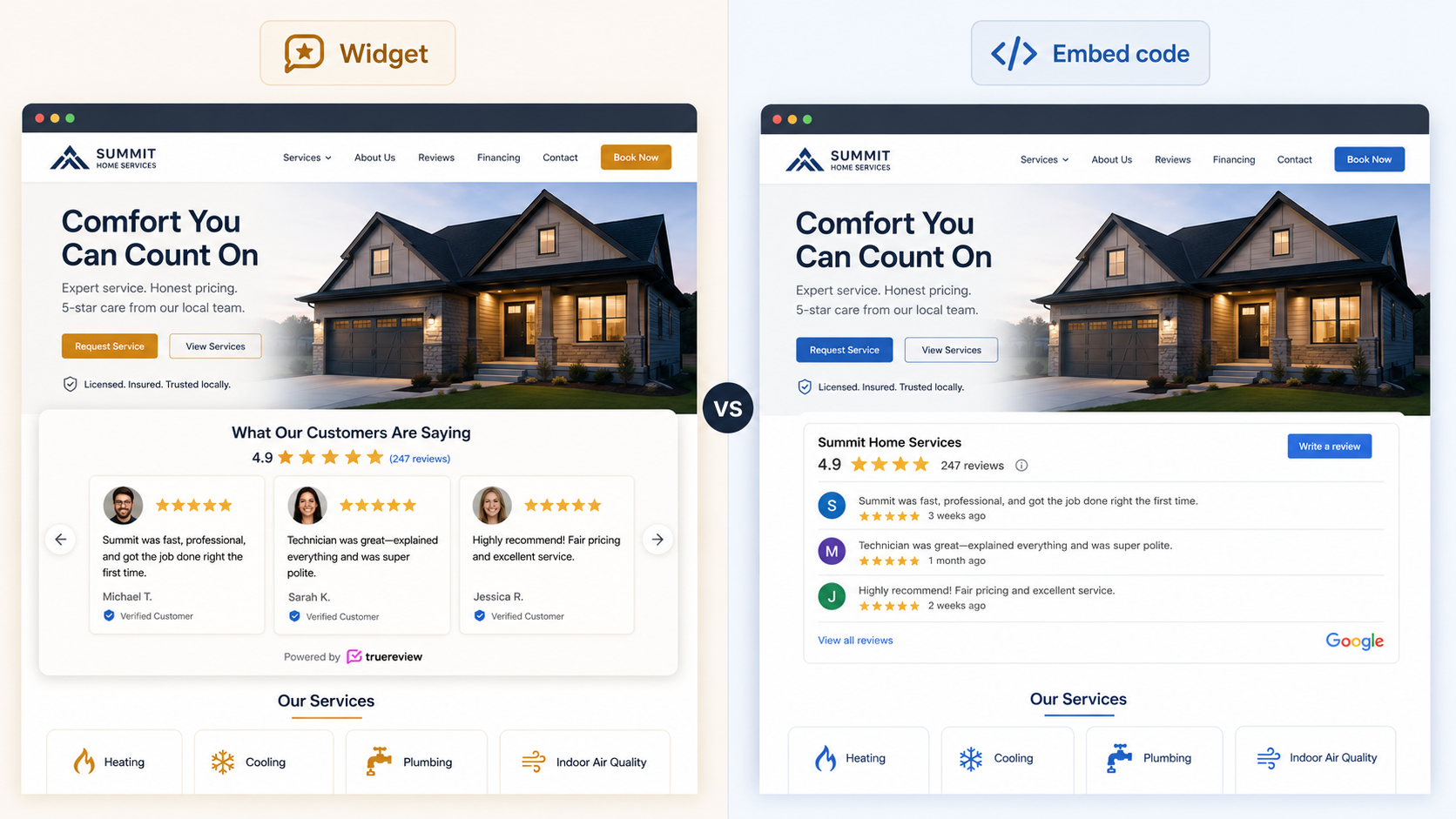
A Google review widget is a pre-built, customizable interface element (a carousel, grid, or badge) that displays your Google reviews on your website. An embedded Google review is the actual code that pulls the review data and renders it on a page.
In practice, the two terms describe the same outcome with different emphasis: a widget is how the reviews are displayed, and embedded reviews is the technical mechanism for displaying them. Most modern widgets use embedded code under the hood, so when someone says "I want to add a Google review widget" and another person says "I want to embed Google reviews," they usually mean the same thing.
The differences that matter in practice are which method you use (Google's iframe, the Places API, a third-party tool) and what level of customization you want — not the terminology itself.
What's a Google Review Widget?
A Google review widget is a pre-built visual component designed to display reviews from your Google Business Profile on your website. It's usually built by a third-party tool or platform (TrueReview, EmbedSocial, Elfsight, Trustindex, etc.) and is designed to be:
- Visually styled — carousels, grids, sliders, badges, single-review cards
- Customizable — colors, fonts, layouts, filters
- Auto-updating — pulls fresh reviews from your Google Business Profile automatically
- Easy to install — typically a copy-paste embed code, no developer required
Think of a widget as a finished product that handles the design, the data fetching, and the display in one package. You pick a layout, customize the look, copy the code, and paste it on your site.
Typical widget examples:
- A horizontal review carousel on your homepage cycling through your top reviews
- A compact "★★★★★ 4.9 (127 reviews)" badge in your footer
- A grid of customer photos and review snippets on a landing page
When you see a clean, branded review section on a business website that visually matches the rest of the site — that's almost always a widget.
What's an Embedded Review?
An embedded review is the broader technical concept of pulling review data and rendering it on a webpage. Embedding can happen several ways:
- Iframe embed (Google's built-in option) — paste a Google-provided iframe code that displays your Maps listing or a specific review
- API integration (Google Places API) — a developer writes custom code that pulls review data via Google's API and renders it however they want
- Third-party widget code — a JavaScript snippet from a service like TrueReview or EmbedSocial that fetches and displays reviews
- Manual embed (screenshots or static HTML) — a non-dynamic version where you paste the review text directly into the page
So "embedded reviews" is the category. "Widget" is one specific form of embedding — specifically, the pre-built, customizable kind.
When to Use a Widget vs Other Embed Methods
The decision tree is simple:
Use a widget when:
- You want reviews to auto-update without touching code
- You want the display to match your website's brand and style
- You want a polished, professional look
- You're not a developer and don't want to manage API credentials
- You need multi-platform support (Google + Facebook + Yelp on one component)
Use Google's iframe embed when:
- You want a fully free, zero-dependency solution
- You only need to show an aggregated star rating, not full review text
- You're also planning to show a Google Maps location embed on the same page
Use Google's per-review embed (three-dot menu → Embed) when:
- You want to feature 1–3 specific reviews on a landing page
- You're okay with the reviews not auto-updating
- You want the official Google branding for the credibility signal
Use the Google Places API directly when:
- You have a developer on your team
- You need full programmatic control over the display
- You're integrating reviews into a larger custom application
Use a static embed (screenshot or hand-coded HTML) when:
- You need a one-time marketing asset
- You're producing a PDF or print material where dynamic content doesn't apply
- (Rarely — avoid this for live websites because screenshots don't auto-update and don't contribute to SEO)
For a deeper walkthrough of each method with step-by-step instructions, see our complete guide to adding a Google review widget.
Pros and Cons at a Glance
| |
Widget (pre-built) |
iframe embed (Google) |
Places API (custom) |
Screenshot (static) |
| Auto-updates |
✓ |
Partial |
✓ |
✗ |
| Customization |
High |
None |
Full |
Full |
| Setup difficulty |
Easy (copy-paste) |
Easy (copy-paste) |
Hard (developer) |
Easy |
| Free option |
✓ (with watermark) |
✓ |
✓ (with limits) |
✓ |
| Schema markup for SEO |
✓ (most paid widgets) |
✗ |
Manual |
✗ |
| Mobile responsive |
✓ |
Limited |
Manual |
Manual |
| Best for |
Most business websites |
Quick free setup |
Custom applications |
One-time assets |
The honest takeaway: for almost every business website, a widget is the right answer. The other methods exist for specific edge cases — fully free zero-dependency setups, custom developer-built solutions, or one-off marketing materials. Widgets win on every dimension that matters for a serious business presence.
How TrueReview Handles Both
TrueReview's review display options cover both widgets and direct embeds, depending on what you need:
Google Review Widget — the standard pre-built widget specifically for Google reviews. Multiple layouts (carousel, grid, badge), full design customization, auto-syncs to your Google Business Profile, includes schema markup for SEO.
Embed Reviews — the broader multi-platform option that handles Google plus Facebook, Yelp, BBB, and 20+ industry-specific platforms in one widget. Useful if your reviews live across multiple platforms and you want a single consolidated view.
Platform-specific widgets — separate widgets for:
All of TrueReview's widgets auto-update, include schema markup, work on any major website platform (WordPress, Webflow, Squarespace, Wix, Shopify, custom HTML), and load asynchronously so they don't slow your page speed.
FAQ
The most common follow-ups on Google review widgets vs embedded reviews.
Is a Google review widget the same as an embedded review?
+
In practice, mostly yes. A widget is a specific type of embedded review — the pre-built, customizable kind. When most people search for one term or the other, they're looking for the same outcome: Google reviews displayed on their website. The technical distinction matters mainly when you're choosing between methods (widget vs. iframe vs. API).
Which method is best for SEO?
+
Widgets that include schema markup are the best for SEO because they tell search engines "this page has a star rating," which can result in star icons appearing in your Google search results. Star ratings in search results can increase click-through rates by 15–35%. Most paid widgets (including TrueReview's) include schema markup automatically. Google's iframe embed does not include schema markup, which is one of its biggest limitations.
Can I use both a widget and an iframe embed on the same site?
+
Yes. Many businesses do — for example, a review widget on the homepage showing a rotating selection of recent reviews, plus a Google Maps iframe on the contact page showing location with the aggregated rating. They serve different purposes.
Will a review widget slow down my website?
+
It can, depending on which one you use. Heavy widgets that load multiple JavaScript files or render many reviews at once can affect your Core Web Vitals scores. Look for widgets that load asynchronously, lazy-load images, and add minimal external dependencies. TrueReview's widget adds about 0.3 seconds to load time, which doesn't typically affect Core Web Vitals.
Can a Google review widget show negative reviews?
+
Most widgets let you filter by minimum rating. Showing only 5-star reviews is technically possible, but research shows it can actually hurt conversion — users suspect perfect ratings are fake. Businesses showing a mix of 4 and 5-star reviews (with thoughtful responses to occasional 4-stars) consistently outperform businesses showing only 5-stars.
Do I need a developer to embed Google reviews?
+
No, for any of the widget options or for Google's iframe embed. You only need a developer if you're building a custom solution with the Google Places API directly.
Can I embed reviews from platforms other than Google?
+
Yes. Most modern widget tools (including TrueReview) support multiple review platforms — Google, Facebook, Yelp, BBB, industry-specific platforms — in a single consolidated widget. This is one of the biggest advantages over Google's own embed options, which are Google-only.
The bottom line
The distinction between "Google review widget" and "embedded Google reviews" is mostly terminology — both refer to displaying your Google reviews on your website. The decisions that actually matter:
- Pre-built widget vs Google's free iframe — depends on whether you want auto-updating, customization, and SEO schema markup
- Widget vs custom API integration — depends on whether you have a developer
- Single-platform widget vs multi-platform — depends on whether your reviews live across multiple sites
For most business websites, a pre-built widget like TrueReview's is the right call. Auto-updating reviews, full design customization, schema markup for SEO, and a 10-second setup — without the limitations of Google's iframe or the development overhead of the Places API.
Ready to set up a Google review widget on your site? Start a free 14-day trial of TrueReview and copy your embed code in 10 seconds, or see pricing.
For the full step-by-step walkthrough of every method (including free options), see our complete guide to adding a Google review widget.